Account Provisioning
You can sync Typing Pal with two identity and access management (IAM) platforms widely used in the education sector: Microsoft Entra ID (beta) and ClassLink.
When you set up provisioning between Typing Pal and your management platform, student and staff accounts are automatically synchronized.
What Is Provisioning?
Provisioning is a process that allows you to allocate an organization’s resources and manage access to its networks. In this context, it means that the accounts created in your institution’s management platform (Microsoft Entra ID or ClassLink) will be used for Typing Pal. You will therefore not need to create Typing Pal accounts. It also means one less account to manage for students and employees!
With provisioning, most account management functions are performed in your management platform rather than Typing Pal. However, functions related to the typing training program are available in Typing Pal’s management interface.
Managed in your Microsoft Entra ID or ClassLink platform
- Personal information (email, last name, first name)
- Usernames and passwords
- Adding, editing and deleting student, teacher and school administrator accounts
- Adding, editing and deleting groups and schools
- Assigning accounts to groups and schools
Managed in Typing Pal
- Interface language
- Language of activities
- Keyboard options
- Access to avatars
- A group’s age group
- Speed and accuracy targets
- Student results
- Default group or school when logging in
Warning — If you have a Typing Pal subscription with accounts, be aware that enabling provisioning will replace the current Typing Pal accounts with your management platform accounts.
You cannot merge or link Typing Pal accounts with another platform’s accounts. Existing Typing Pal accounts and related data will be archived and made unavailable when you enable provisioning.
Particularities
- Moving students from one group to another in your management platform has an impact in Typing Pal. If students are removed from the group in which they started the training program, their progress data will be lost. It is therefore better to wait for the school year to end before moving students to a different group.
- The super administrator’s account is the only one that cannot be synchronized. The super administrator must use the subscription URL to log in to Typing Pal.
Daily Synchronization
Once you enable provisioning, changes you make in your management platform will sync with Typing Pal the following night (according to the UTC-5:00 time zone). This synchronization occurs regularly and during off-hours to ensure it goes off without a hitch.
You cannot initiate account syncing upon request. If you create a new student account in your management platform, for example, it will only appear in Typing Pal the next day, or within 24 hours at the most.
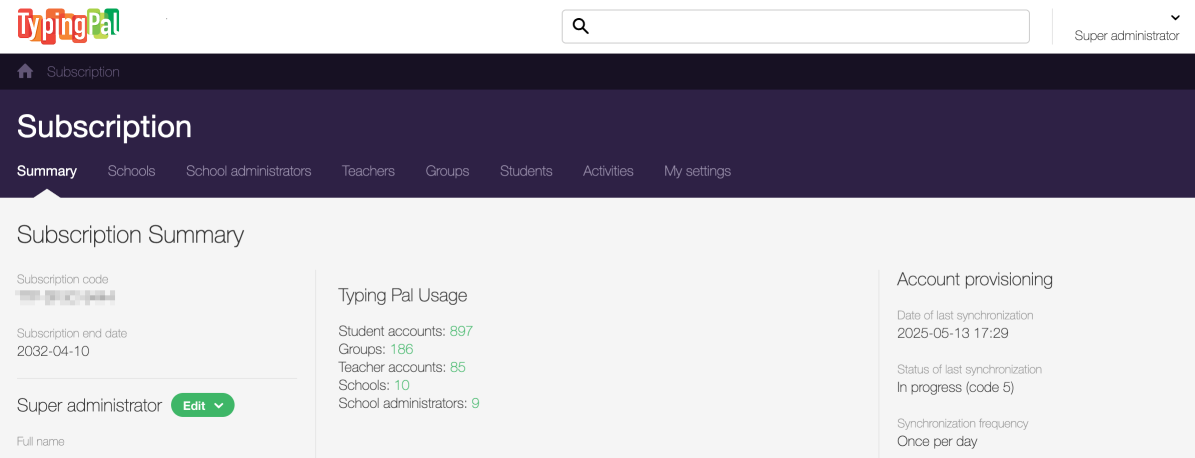
Super administrators can see when the last synchronization occurred in the Subscription Summary.